From a saved program to a working computer
By UK GCSE Computer Science · independent study · myAudience
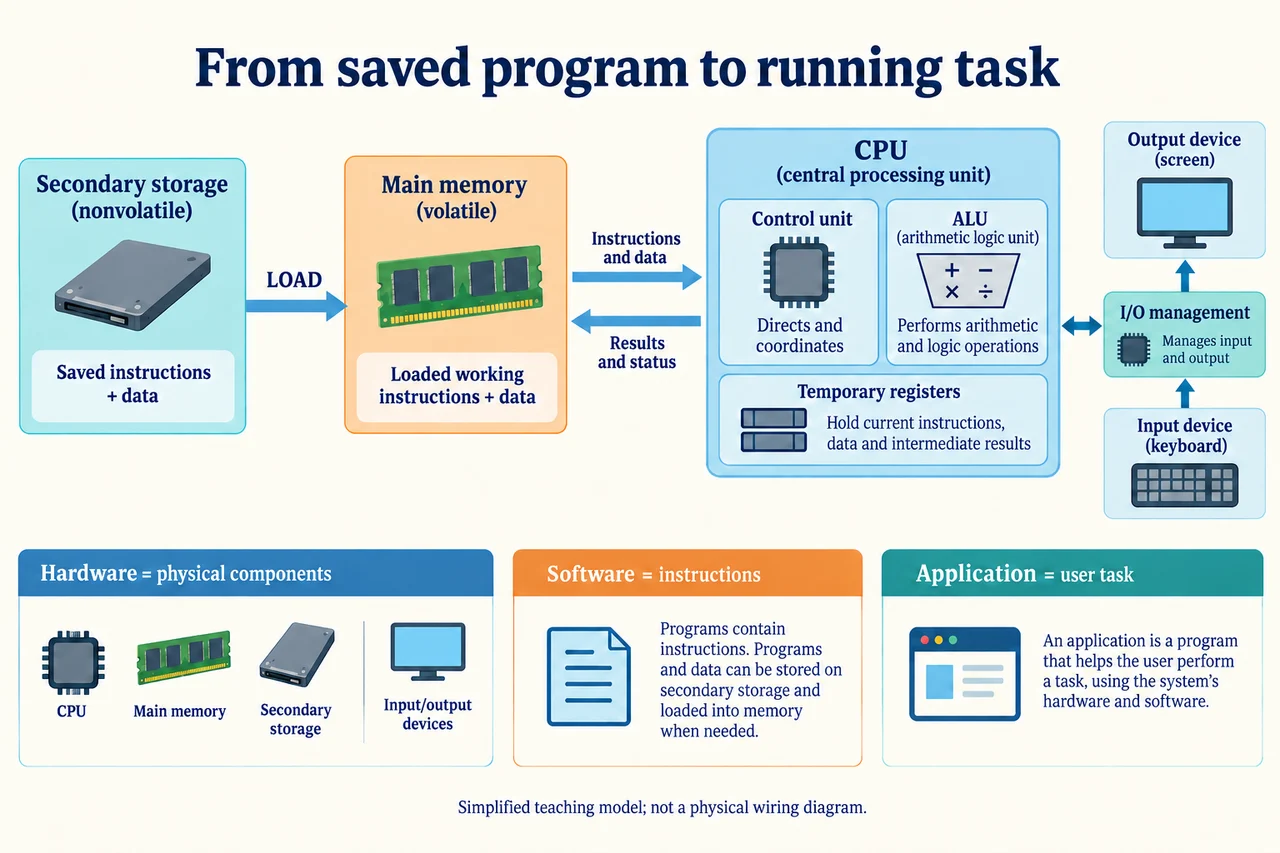
Original AI-generated teaching illustration via built-in image_gen; author inspected 2026-10-04. · Generated project artwork; no copied exam/publisher figure. Independent publication review pending.
From a saved program to a working computer
A saved drawing and a drawing being edited are not the same system state. The saved file persists on secondary storage; the active editor needs instructions and working data available to a processor. Hardware means physical components, while software means instructions that make those components perform a task. Neither is useful as an isolated slogan: a processor cannot choose an editor's purpose without instructions, and instructions cannot display a drawing without physical execution and output devices. This lesson assumes only the earlier distinction between an algorithm and its implementation, not knowledge of named CPU registers.
Opening an application typically causes needed executable instructions and data to be loaded from secondary storage into main memory. Loading is a transfer, not necessarily a move that erases the saved copy. The CPU accesses working instructions and values; input events can change them and output makes results available to the user. The generated diagram deliberately separates saved storage, working memory, execution and I/O. Its boxes describe responsibilities rather than literal chip positions or every communication route in a real computer. Main memory and secondary storage are different roles even when both are casually called memory.
Machine instructions specify operations supported by the processor. A Python source statement is a human-readable program expression, not a promise of one corresponding CPU instruction. Software implementing the Python environment ultimately uses machine instructions to carry out its work. Translation and interpretation receive a separate later lesson; this slice must not replace them with the false claim that the ALU reads Python words directly. A complicated user action, such as applying a filter, may need many operations, reads and writes. The application describes the task; physical execution performs it.
Consider a fictional editor with an 80 MB saved picture. It creates a 120 MB working representation and a 40 MB undo history in RAM. These amounts need not match the saved file: compression, expanded data structures and intermediate results differ. Saving encodes the current state into persistent storage; it does not automatically preserve every unsaved intermediate state. Changing a pixel in RAM is not evidence that the old disk file has changed. An autosave feature is software that makes additional saves, not a property of RAM or a guarantee that every latest edit survived.
Input and output are also mechanisms. A keyboard supplies input events; software interprets an event according to application state. A screen presents output using display hardware and software support. The same key may enter a letter or issue a command because the program context differs. The CPU is not itself the keyboard, and a saved picture is not itself a display. Our schematic shows roles without a hazardous electronics recipe. To explain a fault, identify which step failed: input interpretation, computation, transfer, storage or presentation, rather than saying only that the computer is broken.
A useful diagnostic observation is whether a new edit appears on screen but disappears after an unexpected shutdown. That is consistent with a working state that was never successfully saved; it does not prove the exact failure mechanism. A successfully saved file later opening incorrectly could instead involve corrupted data, a wrong version, a different file path or software interpretation. Sound answers offer a causal explanation and identify evidence needed to distinguish alternatives. Repeating the word hardware for every physical symptom is insufficient: a software bug can produce incorrect visible output on functioning hardware.
The worked storage model assumes a 500 MB RAM allowance for this application. The 120 MB image representation, 40 MB undo history and 90 MB executable/supporting state use 250 MB, leaving 250 MB under this simple additive model. A second 300 MB working picture would exceed that allowance by 50 MB if all previous state remains resident. It does not follow that the saved 80 MB picture has become larger or that the CPU has permanently filled. Actual systems use further memory management; this deliberately bounded example identifies the resource being counted, units and assumptions.
Transfer reasoning must connect persistence to user expectations. Suppose a text editor shows a changed document, a save dialog reports an error and the user powers off. The justified conclusion is that the visible edited state is not enough to establish persistence; the unchanged older file may remain, but recovery depends on successful autosave or other separately written data. A strong answer identifies the error report as contrary evidence to a completed save and avoids guaranteeing either total loss or full recovery. To verify saving, reopen the intended file and check its contents, rather than treating the disappearance of a dialog as proof.
Worked example: Calculate remaining RAM in the fictional editor model and evaluate the second-picture request.
120 + 40 + 90 = 250 MB resident state.
500 − 250 = 250 MB remaining.
300 MB extra would need 550 MB total, exceeding the allowance by 50 MB.
Answer: 250 MB remains; the second request exceeds this bounded RAM allowance by 50 MB, not the secondary-storage capacity.
Check your understanding: A 20 MB saved compressed file expands to 60 MB; editing adds 15 MB history. Does saving prove the history was also stored?
Answer: No. The active representation plus history uses 75 MB here, but saved format and software behavior determine what persists. Evidence of the saved file and its supported contents is required; neither the 20 MB original nor a screen display proves an undo history was saved.
Why: Distinguish resource roles, representation changes and the evidence needed for persistence; sizes alone cannot identify the saved semantics.