RAM, ROM, cache and registers: different jobs
By UK GCSE Computer Science · independent study · myAudience
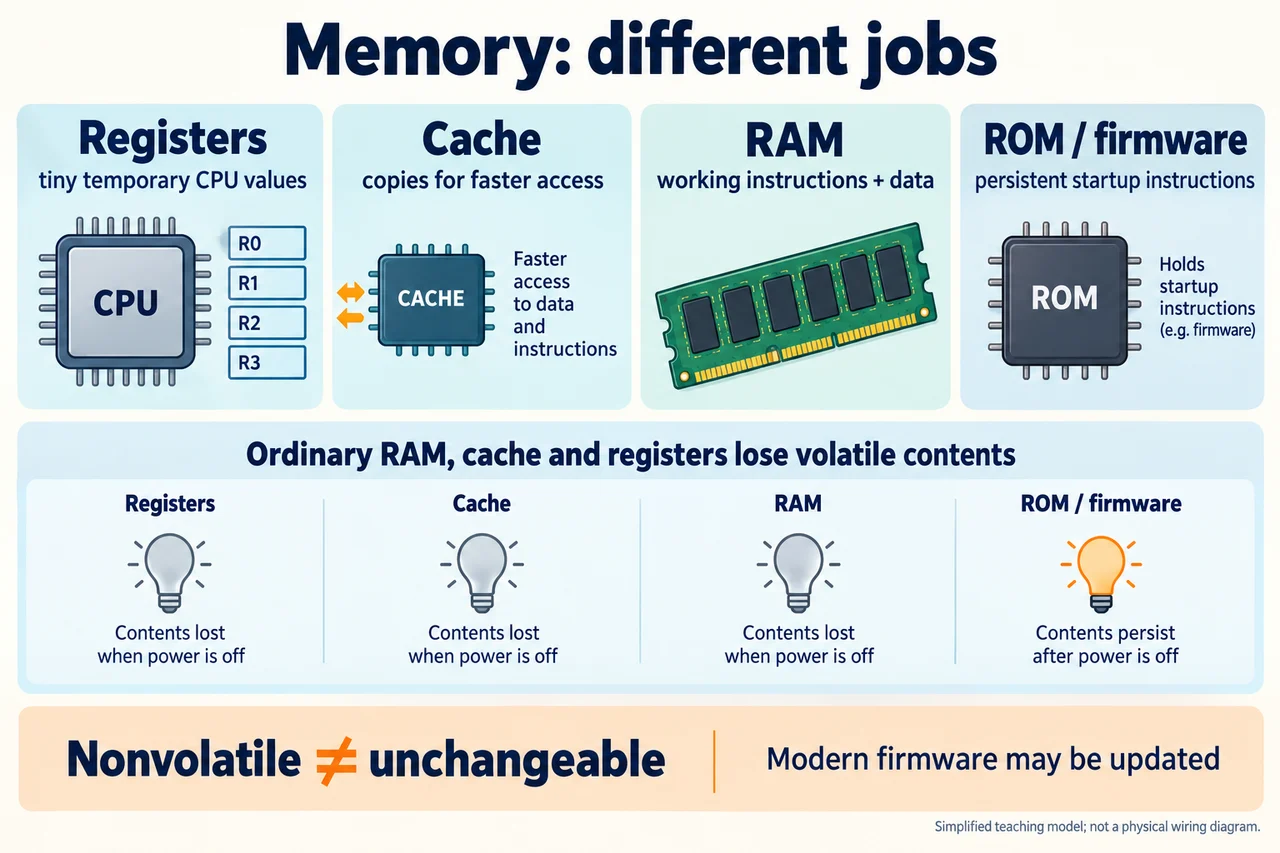
Original AI-generated teaching illustration via built-in image_gen; author inspected 2026-10-04. · Generated project artwork; no copied exam/publisher figure. Independent publication review pending.
RAM, ROM, cache and registers: different jobs
Memory names describe both physical technology and a role in execution. RAM holds working instructions and data that a CPU can access. ROM provides persistent instructions or data, often associated with startup firmware. Cache holds copies useful for faster access, and registers hold small temporary values inside the CPU. In GCSE convention, main memory excludes cache and registers; secondary storage is nonvolatile storage not directly accessed by the CPU in that same main-memory role. This convention guides the comparison rather than pretending all commercial uses of the word memory are identical.
Ordinary RAM is volatile: without the required power its working contents are not retained. That is why an unsaved document needs a successful persistent write before a shutdown. Volatility is not a judgement about quality, speed or whether a device is removable. Nonvolatile storage can preserve data without continuous power but can still fail, be erased or be overwritten. A file on a drive is not immortal. A correct explanation distinguishes the mechanism of retention from the reliability and backup arrangements surrounding it.
ROM means read-only memory, but classroom shorthand must be bounded. Traditional ROM is fixed during ordinary use, and firmware data remains when power is removed. Many modern systems use reprogrammable nonvolatile devices for firmware that can be updated through a controlled process. Nonvolatile therefore does not mean logically impossible to modify. Nor does ordinary writable RAM mean that a program is entitled to access every location. Access control and hardware/software design are distinct from physical retention and write capability.
Cache stores copies of instructions or data so that useful information can often be obtained with less delay than reaching further memory. It is not an extra permanent copy of a user's saved files. A cache miss means the requested item is not available in that cache; further access is necessary. The benefit depends on reuse and access patterns, not on the word cache alone. Larger caches can help suitable workloads, but repeated access to unrelated items may give less benefit. Copy consistency is important; details of real cache protocols exceed this GCSE slice.
Registers differ from main RAM because they are CPU-local temporary storage used directly during operations and control. The preceding teaching machine's working value is one explicit example, not an assessed requirement to memorise a particular register name. The diagram's four memory cards distinguish these jobs; its power-loss icons concern ordinary volatile working contents, not a promise about every specialised device. A modern system can contain multiple forms of nonvolatile memory, and processors may contain specialised storage not shown in this simplified comparison.
Consider a fictional application whose saved document is 2 MB, working state is 8 MB and current result is held temporarily in CPU registers and cache. During a normal saved run, drive, RAM and CPU-related storage all participate without being interchangeable. If the user makes an unsaved edit and power is lost, the persisted version may remain while volatile working state is lost. An autosave can change that outcome only if it actually wrote additional persistent state. The numerical sizes are examples, not a prediction of a particular application's internals.
A transfer scenario asks why adding more RAM does not increase the clock frequency or guarantee that a single small calculation is faster. Additional RAM may let a larger working set remain in main memory or avoid repeated slow transfers, but a task already comfortably fitting in memory may be limited by computation or another resource. Clock timing, available RAM capacity, cache behavior and secondary-storage speed are different factors. Explaining a performance improvement requires identifying which delay or resource shortage changed; a larger number on one specification line is not enough.
Another transfer compares a firmware update with document saving. Both can involve nonvolatile writes, but their permissions, formats and purposes differ. Updating firmware does not convert ordinary RAM into ROM, and saving a document does not make the drive a CPU register. A good answer identifies the retained startup instructions as firmware and the saved user data as secondary-storage content, then acknowledges that modern firmware may be changed through an authorised update. These role and mechanism distinctions prevent the common but contradictory claims that all nonvolatile data is unchangeable or that all readable data is ROM.
Worked example: Explain the likely survival of saved versus unsaved document state after power loss.
Identify persistent saved data separately from volatile working data.
Ordinary RAM/cache/register contents require power and do not supply a durable save.
Recovery depends on separately successful persistent writes, not screen appearance.
Answer: The saved version may remain; the newest unsaved edit is not guaranteed. Nonvolatile retention does not guarantee against device failure.
Check your understanding: A learner says firmware cannot ever be updated because ROM is nonvolatile. Correct the claim without saying all ROM behaves identically.
Answer: Nonvolatility concerns power-loss retention, not universal impossibility of writing. Traditional ROM is fixed during ordinary use, while modern firmware often resides in reprogrammable nonvolatile storage and can be updated through controlled mechanisms. The two properties must be separated.
Why: The answer preserves the basic ROM/RAM distinction while explicitly bounding modern terminology rather than introducing an absolute contradiction.